The camera follows. You run the show.
GimbalPilot watches your camera's video, finds the speaker, and steers your DJI RS gimbal to keep them framed — pan, tilt and zoom, all automatic. It runs in your browser: your camera, your gimbal, one laptop with Chrome. No PTZ camera, no operator, nothing to install.
In plain terms: GimbalPilot is a browser app (Windows and macOS) that controls DJI RS gimbals — the RS 3 Mini verified — over Bluetooth straight from your computer, and uses on-device AI on your camera's HDMI feed to keep a person framed. An ActiveTrack alternative for gimbals that have none.
RUNS IN CHROME OR EDGE · 100% ON YOUR MACHINE · $12/MO · CANCEL ANYTIME
Skip the PTZ camera.
Auto-tracking PTZ cameras are expensive and still shoot worse video than the mirrorless camera you already own. GimbalPilot replaces them with software.
Put your camera on a DJI RS 3 Mini, feed its HDMI into your laptop, open GimbalPilot in a browser tab, and click the person on screen once. From that moment the gimbal follows them — walking the stage, pacing the aisle, turning to the band — while the zoom keeps the framing you chose. If you ever want the wheel back, touch a game controller stick; let go and tracking resumes.
The connection itself is the trick: your computer pairs with the gimbal directly over Bluetooth, something that, as far as we know, only DJI's own phone app could do before. Every other solution we know of needs extra hardware bolted to the rig. GimbalPilot needs a laptop and a browser tab.
If you got here looking for RS 3 Mini auto tracking, an ActiveTrack alternative, a way to control a DJI gimbal from a PC over Bluetooth, or subject tracking with your own camera instead of a PTZ: this is that. We wrote up the whole RS 3 Mini setup — what it does, what it doesn't, what we have actually verified — in the RS 3 Mini auto-tracking guide; the Bluetooth link has a guide of its own.
- CHURCH The pastor walks; the stream stays framed. Volunteers watch the service, not a joystick.
- LECTURES One laptop replaces a camera operator for every talk, panel and town hall.
- SPORT & MORE Track a ball, a horse, a dog — same one-click lock-on.
Your PC talks to the gimbal. Directly.
No phone mounted on the rig, no RavenEye box, no controller dongle — GimbalPilot speaks to the gimbal straight from your computer's own Bluetooth, out of a browser tab. As far as we know, it's the first software in the world that can.
Your camera
HDMI → CAPTURE
GimbalPilot
AI TRACKING · IN YOUR BROWSER
Your gimbal
PAN · TILT · ZOOM
Running a real Sunday service.
GimbalPilot's actual output, uncut: the gimbal pans to keep the speaker framed as he works the stage. No operator, no cuts, no PTZ camera. The clip in the header is the same setup from the room — the Swedish church where GimbalPilot was born and has run the livestream every Sunday since.
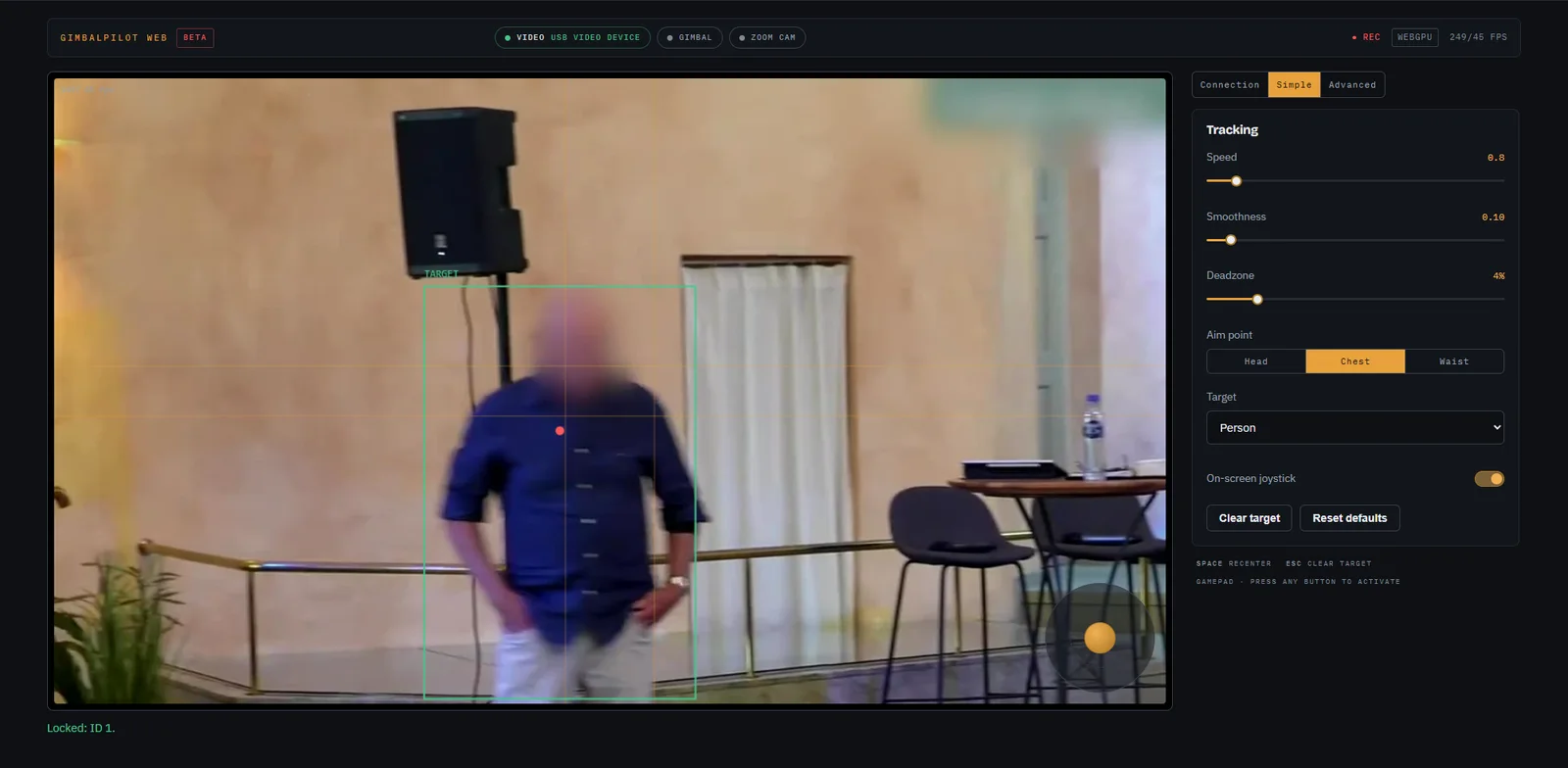
This is what runs it.
One browser tab: your camera feed with a lock-on box around whoever you clicked, and a console beside it. Connection is where the capture device, the gimbal and the camera link live. Simple is speed, smoothness, deadzone, aim point and target type. Advanced opens the regulator, auto-zoom and auto-tune when you want to tune. The top strip shows which backend is running and a live fps readout.
An on-screen joystick and a zoom rocker sit on the monitor itself. Grab a game controller stick any time to take the wheel; let go and tracking resumes on its own.
No install. Nothing uploaded.
GimbalPilot Web is the full tracker in a browser tab. Open gimbalpilot.com/webapp in Chrome or Edge, log in, and the page takes your capture device in through the browser's own media API and talks to the gimbal out through Web Bluetooth. Same direct connection, same tracker, same controls — nothing to download, nothing to keep updated.
Detection runs on your own graphics card through WebGPU (YOLOv8-pose via ONNX Runtime Web), with a WebAssembly fallback for machines without it. Our desktop builds ran inference on the CPU, so on a machine with a reasonable GPU the browser version is typically faster than our desktop app was.
Nothing leaves your machine. The video, the detection and the gimbal control all happen inside the tab; the only thing our server sees is your login.
- WEBGPU The AI runs on your GPU, in the page. No GPU the browser can use? It falls back to WebAssembly.
- WEB BLUETOOTH The gimbal — and your camera's zoom (Sony verified on the ZV-E10 II; Blackmagic Pocket 4K/6K from Blackmagic's documented protocol, not yet verified on hardware) — pair straight from the browser. No hardware in between.
- CHROME / EDGE On Windows, macOS or Linux. Safari and Firefox don't have Web Bluetooth, so they can't talk to the gimbal.
- ALL OF IT Simple and Advanced tiers, all seven target presets, gamepad override and an on-screen joystick — every option the desktop app had.
Prefer a native app? The Windows and macOS desktop apps are coming back soon in compiled form.
Everything a camera operator does
AI speaker tracking
Click a person once. The AI in your browser keeps them framed through walks, turns and lighting changes, and re-acquires them if they leave the frame.
Automatic framing
Pairs with your camera over Bluetooth, straight from the browser, for true variable-speed zoom: Sony bodies with Bluetooth remote support (verified: ZV-E10 II) and the Blackmagic Pocket 4K/6K family (from Blackmagic's documented protocol, not yet verified on hardware). Set a shot size once; it holds as the speaker moves.
Instant manual override
Touch a gamepad stick — or drag the on-screen joystick — and you're flying the camera. Let go, and tracking takes back over. No modes, no fumbling.
Simple by default
Volunteers get three sliders, an aim point and a target type. Operators unlock full regulator tuning, auto-zoom and auto-tune in the Advanced tab.
More than people
Ball, pet, horse, bird, car, boat — pick a target type and the same one-click lock-on applies.
Private by architecture
Video never leaves your browser tab. The AI runs on your own GPU through WebGPU — any graphics card the browser can use, not just NVIDIA — and falls back to WebAssembly when there is none.
Running in three steps
Open the web app
Go to gimbalpilot.com/webapp in Chrome or Edge and log in. Nothing to download, nothing to install — the tracker loads into the tab.
Pick your feed, connect the gimbal
In the Connection tab, choose your capture device, then power on the DJI RS and pick it from the browser's Bluetooth prompt. No phone, no Ronin app in the loop. Got a Sony body (or a Blackmagic Pocket — from Blackmagic's documented protocol, not yet verified on hardware)? Link it there too for zoom — optional.
Click the speaker
Click the person in the monitor, done. The gimbal follows them for the rest of the event; grab a controller stick or the on-screen joystick any time to take over.
Honest about hardware
GimbalPilot speaks DJI's Bluetooth protocol directly. We list exactly what we have verified. The beta grows this list with every new setup.
Verified
- DJI RS 3 Mini GIMBAL
- Sony ZV-E10 II ZOOM CAMERA
- Elgato Cam Link 4K CAPTURE
- Chrome / Edge on Windows 11 · macOS (Apple Silicon) BROWSER · OS
Unverified — help us verify
- Other DJI RS-series gimbals (discovered by the app, untested) UNVERIFIED
- Other Sony bodies with Bluetooth remote support (the app names the ones Sony lists) UNVERIFIED
- Blackmagic Pocket 4K/6K — from Blackmagic's documented protocol, not yet verified on hardware UNVERIFIED
- Any UVC/HDMI capture device USUALLY FINE
- Chrome / Edge on Linux UNVERIFIED
- Canon · Nikon · Fujifilm zoom NOT YET
The beta deal: if your hardware doesn't work, cancel and the current month is refunded. Every report from an unverified setup grows this list. Running an RS 3, RS 4, another Sony body, or a Blackmagic Pocket (from Blackmagic's documented protocol, not yet verified on hardware)? The web app lets you pick any RS-family gimbal the browser's Bluetooth picker shows — we'd love your test report: hello@gimbalpilot.com.
One plan. Every update.
- The full web app in Chrome or Edge — every feature, every update, nothing to install
- Free 7-day trial from your account, no card needed
- Use on your machines, one camera rig at a time
- Cancel anytime from your dashboard, effective end of period
Please test with the free trial before purchasing: it exists so you can verify your exact camera, gimbal and capture setup first. GimbalPilot is in public beta and relies on an unofficial protocol. If a DJI update ever breaks it permanently, you cancel and the current period is refunded. That's the deal. See the refund policy.